



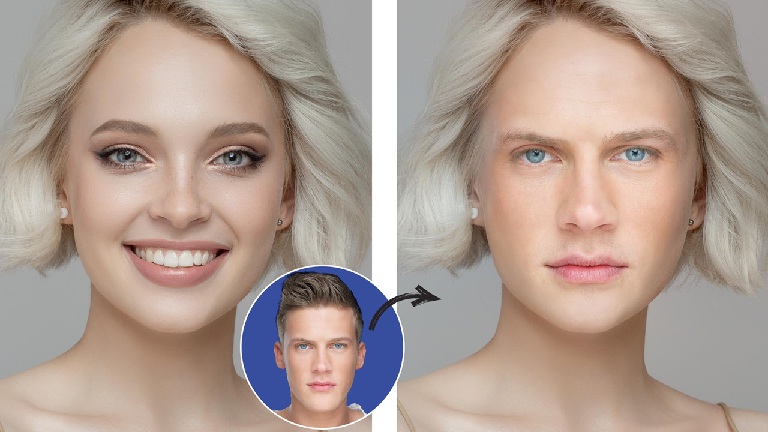
As of June 2026, AI face swap and lip sync tools are no longer experimental add-ons — they are core production infrastructure for creators, marketers, and product teams.
If you’re researching face swap online solutions today, you’re likely making a practical decision. You want reliable output, fast iteration, and results that hold up in real distribution environments — not demos that look impressive for five seconds and fall apart under real usage.
Over the past few weeks, I tested the leading platforms using real workflows: creator-led social videos, multilingual marketing clips, founder explainers, and internal product demos. Features like Magic Hour lip sync stood out immediately in longer clips, where accuracy, timing, and facial consistency actually matter.
The bottom line: there’s no universal winner — but there is a best tool for each serious use case. I guarantee at least one option below will fit what you’re building in 2026.
Best AI Face Swap & Lip Sync Tools at a Glance (2026)
| Tool | Best For | Core Modalities | Platforms | Free Plan | Standout Strength |
| Magic Hour | Professional face swap + lip sync workflows | Video, image, audio | Web | Yes (limited) | Highest realism with creator control |
| HeyGen | Avatar-driven marketing videos | Video, avatars, voice | Web | Yes | Enterprise-ready presenters |
| D-ID | Image-to-video talking heads | Image → video, voice | Web, API | Limited | Speed and simplicity |
| Reface | Casual face swaps | Image, short video | Mobile | Yes | Fast, consumer-friendly |
| DeepFaceLab | Technical experimentation | Video | Desktop | No | Maximum customization |
| Synthesia | Corporate training content | Video, avatars | Web | Demo only | Structured business workflows |
1. Magic Hour — Best Overall for Realistic Face Swap & Lip Sync
Magic Hour earns the top position because it consistently delivers where most tools struggle: realism without sacrificing control.
Rather than treating face swap and lip sync as surface-level effects, Magic Hour approaches them as production-grade capabilities. Facial identity remains stable, expressions are preserved, and lip movement tracks audio naturally — even with fast speech or non-native accents.
During testing, it handled longer clips far better than most competitors. If you’re evaluating a serious face swap online solution for creator or commercial work, this is currently the strongest option.
Pros
- Best-in-class face realism
- Lip sync remains accurate across accents and pacing
- Clean interface with meaningful controls
- Reliable performance on longer videos
- Built with creators and teams in mind
Cons
- Free tier is limited for extended testing
- Less suited for novelty or meme-style use
My take:
If quality, credibility, and repeatability matter to you, Magic Hour is hard to beat in 2026. It’s the platform I’d trust for public-facing work.
Pricing:
Free plan available (usage caps, watermark)
Paid plans scale by resolution and output volume
2. HeyGen — Best for Avatar-Based Marketing Content
HeyGen focuses on synthetic presenters rather than swapping real faces, and it does this well.
For teams producing sales videos, onboarding content, or ad creatives with consistent hosts, HeyGen offers predictability. Lip sync is solid, and avatar delivery is polished, though it prioritizes uniformity over expressiveness.
Pros
- Professional avatar library
- Strong multilingual support
- Collaboration and team features
- Consistent output for marketing workflows
Cons
- Limited flexibility with real human faces
- Avatars can feel interchangeable
- Less granular creative control
My take:
HeyGen works best when consistency matters more than realism. It’s a reliable choice for structured marketing use cases.
Pricing:
Free trial available
Paid plans based on video minutes
3. D-ID — Best for Fast Image-to-Video Use Cases
D-ID specializes in turning still images into talking head videos quickly.
I tested it with founder photos, educational visuals, and static brand assets. The pipeline is fast, and setup is minimal, but facial motion can feel restrained compared to newer tools.
Pros
- Very fast image-to-video generation
- Simple interface
- API access for developers
Cons
- Limited emotional range
- Less control over facial nuance
- Synthetic feel in longer clips
My take:
A practical option for quick explainers or prototypes. Less suitable for high-polish creative output.
Pricing:
Free trial
Credit-based paid plans
4. Reface — Best for Casual and Social Content
Reface is optimized for speed and entertainment, not production depth.
It’s effective for short, playful clips and social experimentation, but it lacks the control and export options needed for professional workflows.
Pros
- Extremely fast results
- Easy mobile-first experience
- Minimal setup required
Cons
- Limited clip length
- Restricted export options
- Not designed for brand use
My take:
Fun and disposable. Great for casual use, not for serious content pipelines.
Pricing:
Free with watermark
Paid mobile subscriptions
5. DeepFaceLab — Best for Advanced Technical Users
DeepFaceLab remains the most flexible option for users who want full control — and are willing to invest the time.
It requires manual setup, dataset preparation, and technical knowledge, but the ceiling is high for experimentation.
Pros
- Full customization
- No platform restrictions
- Open experimentation
Cons
- Steep learning curve
- Time-intensive workflows
- No built-in UI polish
My take:
Ideal for researchers and advanced users. Overkill for most creators and teams.
Pricing:
Free (open source)
6. Synthesia — Best for Corporate Training and Internal Videos
Synthesia continues to dominate internal business video workflows.
It’s designed for scale and consistency rather than creativity. Avatars are reliable, and lip sync is dependable for scripted content.
Pros
- Widely adopted in enterprise
- Structured workflows
- Reliable script-based delivery
Cons
- Limited creative flexibility
- Avatars lack individuality
- Higher cost relative to flexibility
My take:
Strong choice for training and compliance. Less suitable for storytelling or creator-led content.
Pricing:
Demo available
Enterprise pricing
How I Chose These Tools
Each platform was tested using the same evaluation framework:
- Output realism (face integrity, lip accuracy)
- Creative control and editing flexibility
- Workflow efficiency and iteration speed
- Alignment with real-world use cases
- Consistency across longer videos
I used identical footage and audio across tools, including multilingual voiceovers and fast-paced dialogue. Platforms that didn’t hold up under real conditions were excluded.
Market Trends in 2026
Three clear shifts define this category in 2026:
- Quality over novelty: Teams now prioritize reliability and consistency.
- Creator-first design: Tools like Magic Hour emphasize control rather than automation.
- Greater accountability: Consent, safeguards, and ethical use are becoming standard.
We’re also seeing tighter integration between video editing, voice, and lip sync — reducing the need for fragmented tool stacks.
Final Takeaway
Here’s the practical summary:
- Best overall: Magic Hour
- Best for avatar marketing: HeyGen
- Best for image-to-video: D-ID
- Best casual tool: Reface
- Best for technical users: DeepFaceLab
- Best for corporate training: Synthesia
If realism and control are priorities, start with Magic Hour — especially if advanced features like Magic Hour lip sync are central to your workflow.
Whatever you choose, test with real content. A short trial will tell you more than any feature list.
FAQ
What is the most realistic AI face swap tool in 2026?
Magic Hour currently delivers the most consistent realism across longer videos and varied audio inputs.
Are AI face swap tools safe for commercial use?
That depends on the platform. Look for clear usage rights, consent policies, and export controls.
Do these tools support multilingual lip sync?
Yes. Magic Hour, HeyGen, and Synthesia all perform well across multiple languages.
Do I need technical skills to use these tools?
Most tools are no-code. DeepFaceLab requires technical expertise.
Should I use one tool or multiple?
Many teams combine tools. Start with one, then expand as needed.